
Restart web servers one at a time and stop when something fails
Avoid the outage of restarting everything at once. Restart one server, check its health, move on to the next, and stop as soon as one fails.
ProSince 0.10.05 min to set up
Features usedBatch runRolling runRerun failed servers onlyDangerous command confirmation
The situation
You changed a setting and need to restart ten web servers. If you send the restart to all of them at once and the setting has a typo, all ten go down together. So you usually connect to one server at a time, restart it, check that it comes back, and move on.
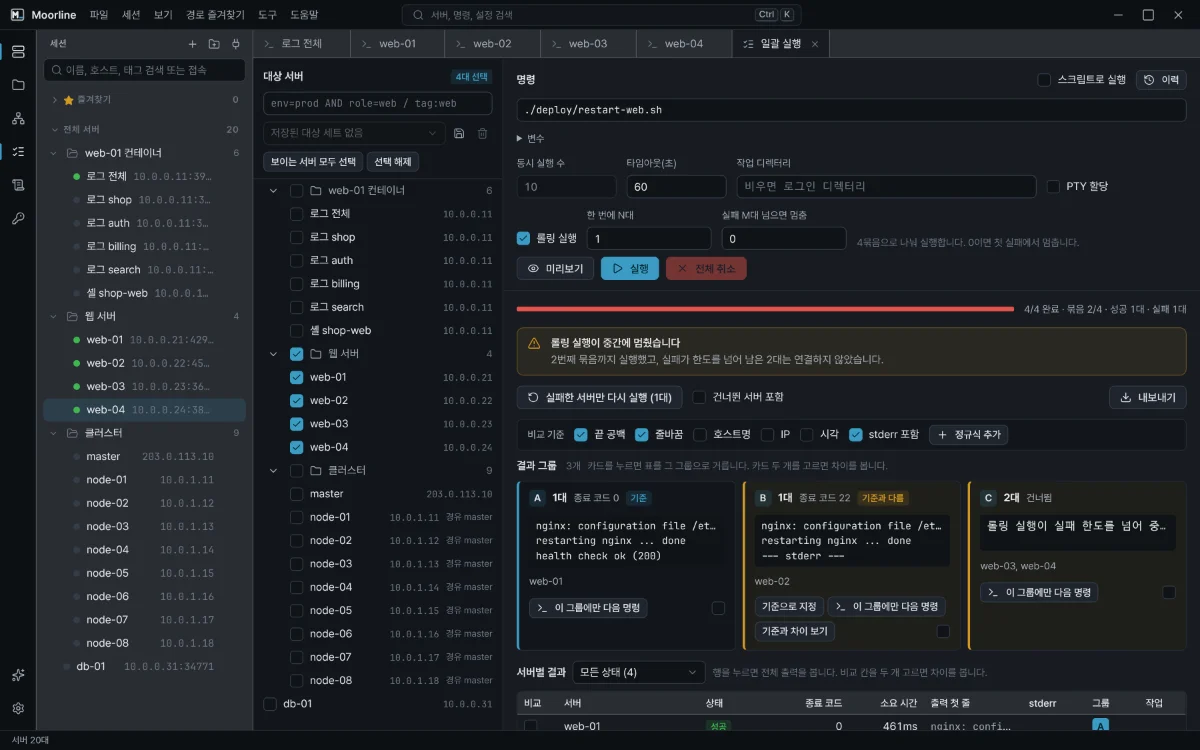
The Rolling run in Batch run does this for you. It runs the command in waves, and when failures go over the number you set, it sends nothing to the remaining servers.
How to do it
- In Batch run in the rail, check the web server group.
- Turn on Run as script and write the restart and the check as one block. If the last line fails, that server is recorded as failed.
- Turn on Rolling run and set "Servers per wave" to 1 and the failures to allow to 0.
- Check the per-server commands in the preview, then run.
The script for step 2:
sudo -n nginx -t
sudo -n systemctl restart nginx
sleep 3
curl -fsS -o /dev/null http://127.0.0.1/healthz
If the config test or the health check fails on the first server, the run stops there and leaves the other nine untouched. After you fix the problem, continue with Rerun failed servers only.
Tips
- To try one server first, check only that server and run, then run the rest as a rolling run.
- If you have commands that take a server out of the load balancer and put it back, add them before and after the script.
- With many servers, raise the wave size to 2 or 3 to save time.
Good to know
- Batch run never opens prompts, so you cannot type a
sudopassword. Allow the restart command to run without a password on the servers. In the example,sudo -nmakes a server where that is not allowed fail right away instead of waiting. - If production servers are included, you must enter the number of targets before the run.
- A script moves on to the next line even when one line fails. To stop right after an earlier step fails, put
set -eon the first line.
Checked with an automated test that a rolling run stops at the failure limit and sends no command to the servers after it.