
Use casesInternal network access
Reach the internal nodes of a cluster that only exposes its master
When only the master is reachable from outside and the other nodes sit on the internal network, connect to each node directly through the master and send one command to all of them at once.
ProSince 1.0.010 min to set up
Features usedJump hostImport OpenSSH configBatch runSFTP
The situation
Only the master node accepts SSH from outside, and the 16 worker nodes have internal addresses only. Today you connect to the master and type ssh node-07 from inside it. That way you cannot download a node's files straight to your PC, and running the same command on all 16 nodes means writing a loop yourself.
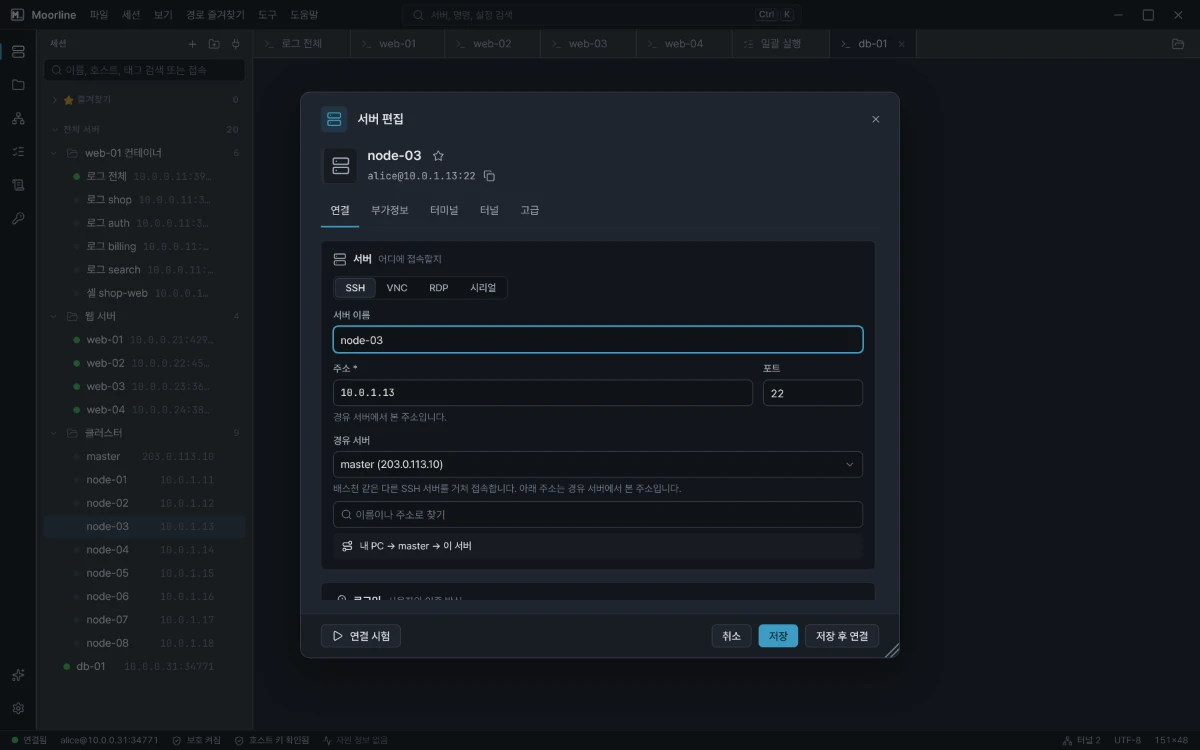
If you set a Jump host on a server entry, Moorline connects to the node directly through the master. The terminal, file transfer, batch run, and server resources all use the same route.
How to do it
1. Add all 16 nodes at once
Write a config file like the one below and load it with Import OpenSSH config. Each ProxyJump line becomes a jump host.
Host master
  HostName 203.0.113.10
  User ops

Host node-01
  HostName 10.0.1.11
  User ops
  ProxyJump master

Host node-02
  HostName 10.0.1.12
  User ops
  ProxyJump master
You can also add them by hand. Create one node, choose the master under Jump host on the Connection tab of the server editor, then duplicate that entry and change only the address. Use the internal address as seen from the master.
2. Connect straight to a node
Double-click a node entry. Moorline signs in to the master and then to the node, and every prompt says which hop it belongs to. After you connect, the status bar shows Via 1 hop. The SFTP sidebar shows the node's files right away.
3. Send a command to every node
- Connect to each node once, trust its host key, and save its password. Batch run never opens prompts.
- Open Batch run in the rail and check the node group.
- Enter the command and run it. Moorline signs in to the master once and shares that connection.
Nodes with the same output are grouped, so the one node out of 16 that answers differently stands out immediately.
Good to know
- The SSH server on the master must allow port forwarding (
AllowTcpForwarding). If it is blocked, the reason is shown when you connect. - Authentication to the nodes happens on your PC. If the key that gets you into the nodes exists only on the master, register that key in Moorline or use the nodes' account passwords.
- A jump chain can be up to 4 hops long. If the connection to the master drops, the node connection drops with it, and reconnecting resumes from the hop that dropped.
- Batch run runs on 10 servers at a time by default. To run all 16 at once, raise Concurrency to 16.
Connecting through a jump host and running a batch on jump-host targets were checked with automated tests (a two-hop chain, batch run, file transfer).